AlohaMini 2 · 3D printing#
applicable model: Standard AlohaMini 2. Pro users please read the 2 Pro hardware first; the material quantity, printouts and assembly photos on this page correspond to the standard version.
The second generation Mobile Base 2 adopts a block printing solution and is aimed at Bambu P2S-class consumer printers. This page lists all recommended printing files, quantities, materials and pre-assembly inspections for the fuselage; please use the version corresponding to AM-ARM200 for robotic arm prints.
Get the correct file#
Find in the root directory of the hardware warehouse:
AlohaMini2/hardware/mobile_base2/stl/
Open STL directory. The catalog contains both the normal chassis block and the PrintOptimized version. The following list uses the optimized version, and there is no need to print both sets of chassis.
Recommended slicing parameters#
parameters |
Original guideline recommendations |
Instructions for use |
|---|---|---|
Material |
PLA, PETG, ABS and other FDM materials |
Choose based on equipment capabilities, structural usage and printing experience |
Number of wall layers |
4–6 floors |
The load-bearing structure preferably uses 6 layers |
fill rate |
15–25% |
Together with the wall layer and printing direction, it affects the strength of the finished product. |
support |
Enable by slicer judgment |
Check the support and cleanability of shaft holes, racks, wire troughs and mounting cavities |
The original guide did not fix nozzle diameter, layer height, nozzle temperature, or print speed. Please use the verified configuration of your chosen material and printer. Do not consider the wall layer and infill suggestions here as complete material configurations.
Material selection#
Material |
Applicable considerations |
Follow when printing |
|---|---|---|
PLA |
Easy to print, suitable for verification assembly and general testing |
Low heat resistance, please pay attention to the use environment |
PETG |
Good toughness |
Easy to draw, the supports near the rack and gear may stick; PLA or special support interface materials may be considered |
ABS |
Original guide as an option for higher heat requirements |
More susceptible to warping, requiring a closed printing environment and temperature control suitable for the material |
Final strength also depends on interlayer bonding, part orientation, glue joints and fastening quality. Load-bearing parts should be inspected for cracks, warpage, and assembly gaps after printing.
Complete print list#
Print one piece per STL except quantities noted in table. When using metallic steel pins or aluminum profiles, the corresponding printed replacement is skipped.
STL files |
Quantity |
Purpose/Description |
|---|---|---|
|
3 |
Printed replacement parts for chassis steel pins |
|
1 |
|
|
1 |
|
|
1 |
Printed replacement for T-frame aluminum profile |
|
1 |
Printed replacement parts for lift shaft steel pins |
|
1 |
|
|
3 |
|
|
3 |
|
|
3 |
|
|
3 |
Recommended chassis block version |
|
3 |
|
|
1 |
|
|
1 |
|
|
1 |
|
|
1 |
|
|
1 |
|
|
1 |
|
|
1 |
|
|
1 |
|
|
1 |
|
|
1 |
|
|
2 |
|
|
1 |
|
|
1 |
Chassis and load-bearing parts#
The chassis has a large block area. Check the contact, support, joint surface and warping risk of the first layer before printing. Recommended documents:
OB_Chassis_Segment_1of3_PrintOptimized.stl
The three chassis are integrated by connecting pieces, locking wedges and glue. Before assembling, dry assemble first and confirm that the seams and the column base holes fit properly before proceeding to the gluing step.
Printed replacement parts are available for T-frame cross members, chassis steel pins, and lift shaft steel pins. The original guidance clearly stated that these replacements would significantly reduce structural strength; the final load-bearing version prioritized metal parts from the BOM.
Print tray layout reference#
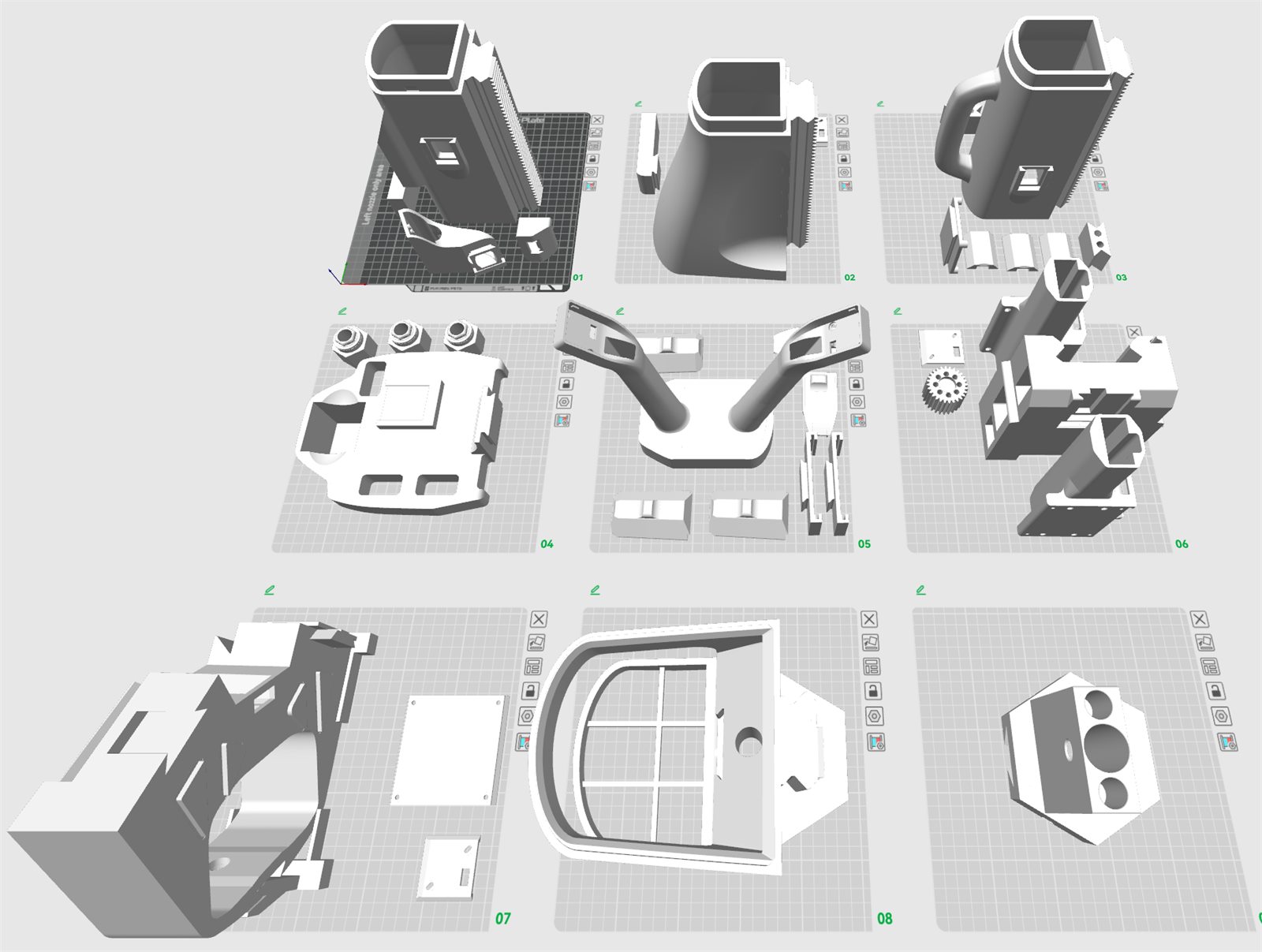
Spreadsheet representation from the original guide. Please check the actual support and placement based on the current STL and sectioning results.#
Check items one by one before assembly#
Chassis: Clean the wheel wells, wire grooves, pin holes and locking wedge grooves, and there is no support residue on the splicing surface.
column: The joint surfaces of each section are flat, the racks are continuous, and the wiring holes are through.
shoulder: bearing mounting hole has no burrs, and the bearing can rotate freely after being pressed in.
gear: has complete tooth surface and no support adhesion or obvious deformation.
camera and display bracket: Try fitting the screw holes, cover plate and chute first, and do not forcibly screw in mismatched screws.
heat-set inserts location: Confirm the specifications according to the robot arm and structure diagram to avoid blocking the assembly path after installation.
After the printed parts are ready, assemble](assembly.md) according to [hardware starting from the servo ID and chassis.