Bill of Materials#
← Tutorial Library · AlohaMini Hardware and Operation
Please confirm the applicable models based on the hardware configuration on this page. Pi is the robot terminal and PC is the operating terminal; the power supply needs to be confirmed according to the physical rating.
AlohaMini follows the same architecture and terminology as LeKiwi, consisting of a Client side and a Host side.
The Client handles computation and control.
The Host executes commands and returns observations.
This is also commonly referred to as PC side vs. Remote side, and both naming conventions are equivalent.
AlohaMini’s Client hardware includes the mobile base and two follower arms. The arms directly reuse the SO-ARM100 design. Therefore, if you already have two SO-ARM100 arms, you only need to assemble the mobile base. Communication between the mobile base, arms, and Raspberry Pi 5 uses the same bus-servo communication system, and the build guide will explain the wiring in detail.
On AlohaMini, the Host side consists of a PC workstation and leader arms. VR controllers or other devices can also replace the leader arms, and we will release compatible controller kits soon. For beginners, we recommend starting with leader-arm teleoperation.
Note: Table clamp, screwdriver set, soldering iron, and other common tools can be sourced as needed and are not listed in the tables below.
Mobile base#
Item |
Model / Notes |
Qty |
Unit Cost (US) |
Buy (US) |
Unit Cost (CN) |
Buy (CN) |
|---|---|---|---|---|---|---|
Servo motor |
Feetech / 12V 1/345 Gear(STS3215-C018) |
4 |
$13.89 |
¥110 |
||
Omni wheel |
4″ (≈100 mm) |
3 |
$47 |
¥135 |
||
USB camera |
720p focal length 2.4 mm, 36×36 mm form factor |
3 |
— |
Amazon |
¥125 |
|
(optional) Bearing |
12×18×4 mm (ID × OD × W) — wheel axle bearing |
3 |
— |
Amazon |
¥6 |
|
Bearing |
4×13×5 mm (ID × OD × W) — lift axis bearing |
8 |
— |
Amazon |
¥3 |
|
M2×12 Phillips screw |
For camera mounts (OB_T_Camera_Mount.stl, OB_Top_Camera_Mount) |
12 |
— |
— |
— |
— |
M3×12 hex socket screw |
Total 36 pcs (Servo Mount×24 ,Side Panel×12 ) |
36 |
— |
— |
— |
— |
M3×18 hex socket screw |
For OB_Chassis_Wheel_Axle_Connector.stl |
12 |
— |
— |
— |
— |
M3×30 hex socket screw |
For OB_T_Connector_Right/Left.stl |
8 |
— |
— |
— |
— |
M3 hex nut |
For OB_T_Connector_Right/Left.stl |
8 |
— |
— |
— |
— |
M3x5x4 heat-set insert |
Total 36 pcs (Servo Mount×24, Side Panel×12) |
36 |
— |
Amazon |
¥5 |
|
M4×12 hex socket screw |
Total 20 pcs (Bearing Cover×12, Z-axis Servo Mount×8) |
20 |
— |
Amazon |
— |
— |
M4x6x5 heat-set insert |
For OB_Chassis_Bearing_Cover.stl |
12 |
— |
Amazon |
¥4 |
|
Adhesive |
Epoxy (strongly recommended) / double-sided tape — cable retention & structural bonding |
1 |
— |
Amazon |
¥12 |
|
Servo extension cable |
SCS 3-pin, 90 cm |
2 |
— |
¥3 |
||
Battery |
12 V Li-ion pack with 5521 barrel jack (male & female); one pack for the Raspberry Pi 5, the other for the mobile base and follower arms. |
2 |
$43 |
¥130 |
||
USB Type-C cable |
Only for testing the mobile base |
1 |
$10 |
¥20 |
||
Waveshare Bus Servo Controller |
Only for testing the mobile base |
1 |
$13 |
¥27 |
||
3D-printed parts |
PLA/PETG/ABS (files in /hardware/mobile_base/stl) |
~4 kg filament |
— |
— |
— |
— |
3D Printing Parts List:
OB_Chassis_Bearing_Cover x3
OB_Chassis_Servo_Mount x3
OB_Chassis_Side_Panel x3
OB_Chassis_Wheel_Axle_Connector x3
OB_Chassis_Wheel_Guard x3
OB_Top_Camera_Back_Cover x2
OB_Chassis_Shaft_Sleeve_12_24 x3
O_Chassis_Dowel_Pin_12_37 x3
All other files x1
Note: All other parts — including the lift mechanism — can be printed on a standard 3D printer. Only the chassis is special, as it requires a build volume of at least 385 × 345 × 64 mm. We recommend choosing a machine with around 400 × 360 × 100 mm or larger. Due to its size, the chassis may need to be outsourced for printing.
What the Base Can Do#
With only the components above, you can assemble the mobile base and control:
movement
vertical lift
Use the following commands to control the base:
python examples/debug/wheels.py \
   --port /dev/ttyACM0

python examples/debug/axis.py \
   --port /dev/ttyACM0
Use W/S/A/D to drive the base, and U/J to raise or lower the lift — all directly from your PC, without installing any single-board computer on the robot.
More details will be provided in the software setup section.
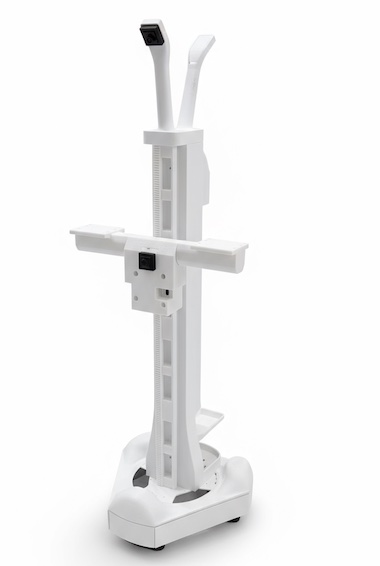
Effect after assembly:
Standalone Mode (Optional)#
If you prefer the base to operate as an independent host system (Wi‑Fi, untethered), add:
Follower Arms#
Item |
Model / Notes |
Qty |
Unit Cost (US) |
Buy (US) |
Unit Cost (CN) |
Buy (CN) |
|---|---|---|---|---|---|---|
Servo motor |
Feetech / 12V 1/345 Gear(STS3215-C018) |
12 |
$13.89 |
¥110 |
||
Waveshare Bus Servo Controller |
For connecting to the Raspberry Pi 5 |
2 |
$13 |
¥27 |
||
USB camera |
720p focal length 3.8 mm, 32×32 mm form factor |
2 |
— |
Amazon |
¥103 |
|
1-to-2 DC splitter cable |
30 cm, 5521 connector — for powering the arms |
1 |
— |
Amazon |
¥5 |
|
DC extension cable |
1.5 m, 5521 connector — for powering the arms |
2 |
— |
Amazon |
¥2.50 |
|
USB Type-C cable |
For connecting to the Raspberry Pi 5 |
2 |
$10 |
¥20 |
||
3D-printed parts |
PLA/PETG/ABS (files in /hardware/arms/stl) |
1 set |
— |
— |
— |
— |
3D Printing Parts List:
All “D_*.stl” files: x2
All “F_*.stl” files: x2
For detailed printing instructions, refer to the SO-ARM100 project README
Leader Arms#
Note: The official SO-ARM100 design uses three different gear ratios (1/147, 1/191, 1/345) for optimal performance. However, our testing shows that using a single gear ratio (1/147) provides excellent user experience and significantly simplifies assembly. The BOM below reflects this simplified configuration.
Item |
Model / Notes |
Qty |
Unit Cost (US) |
Buy (US) |
Unit Cost (CN) |
Buy (CN) |
|---|---|---|---|---|---|---|
Servo motor |
Feetech / 7.4V 1/147 Gear(STS3215-C046) |
12 |
$13.89 |
¥99 |
||
Waveshare Bus Servo Controller |
For connecting to the PC |
2 |
$13 |
¥27 |
||
Battery |
5V Li-ion pack (5600mAh, DC 5521 connector) |
1 |
— |
Amazon |
¥30 |
|
1-to-2 DC splitter cable |
70 cm — for powering the arms |
1 |
— |
Amazon |
¥5 |
|
USB Type-C cable |
For connecting to the PC |
2 |
$10 |
¥20 |
||
3D-printed parts |
PLA/PETG/ABS (files in /hardware/arms/stl) |
1 set |
— |
— |
— |
— |
3D Printing Parts List:
All “D_*.stl” files: x2
All “L_*.stl” files: x2
For detailed printing instructions, refer to the SO-ARM100 project README