HopeJR#
← Tutorial Library · Other Hardware and teleoperation
This section introduces the general functions of LeRobot. Please configure the example according to the target robot, data set and operating environment; before using it with AlohaMini 2 / 2 Pro, you need to confirm the hardware and interface compatibility.
Prerequisites#
Install LeRobot#
Follow the installation instructions to install LeRobot.
Install LeRobot with HopeJR dependencies:
pip install -e ".[hopejr]"
Device Configuration#
Before starting calibration and operation, you need to identify the USB ports for each HopeJR component. Run this script to find the USB ports for the arm, hand, glove, and exoskeleton:
lerobot-find-port
This will display the available USB ports and their associated devices. Make note of the port paths (e.g., /dev/tty.usbmodem58760433331, /dev/tty.usbmodem11301) as you’ll need to specify them in the --robot.port and --teleop.port parameters when recording data, replaying episodes, or running teleoperation scripts.
Step 1: Calibration#
Before performing teleoperation, HopeJR’s limbs need to be calibrated. Calibration files will be saved in ~/.cache/huggingface/lerobot/calibration
1.1 Calibrate Robot Hand#
lerobot-calibrate \
    --robot.type=hope_jr_hand \
    --robot.port=/dev/tty.usbmodem58760432281 \
    --robot.id=blue \
    --robot.side=right
When running the calibration script, a calibration GUI will pop up. Finger joints are named as follows:
Thumb:
CMC: base joint connecting thumb to hand
MCP: knuckle joint
PIP: first finger joint
DIP : fingertip joint
Index, Middle, Ring, and Pinky fingers:
Radial flexor: Moves base of finger towards the thumb
Ulnar flexor: Moves base of finger towards the pinky
PIP/DIP: Flexes the distal and proximal phalanx of the finger
Each one of these will need to be calibrated individually via the GUI. Note that ulnar and radial flexors should have ranges of the same size (but with different offsets) in order to get symmetric movement.
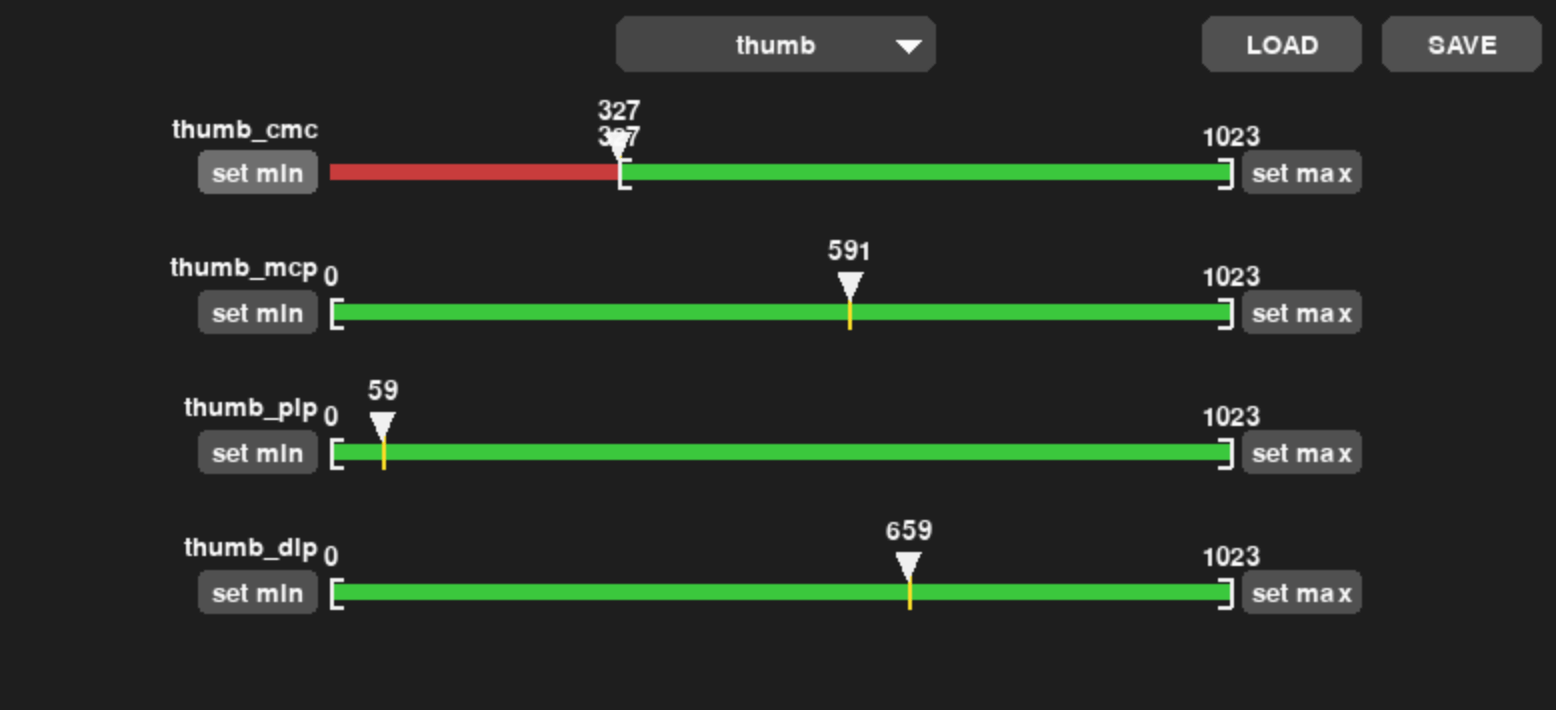
Use the calibration interface to set the range boundaries for each joint as shown above.
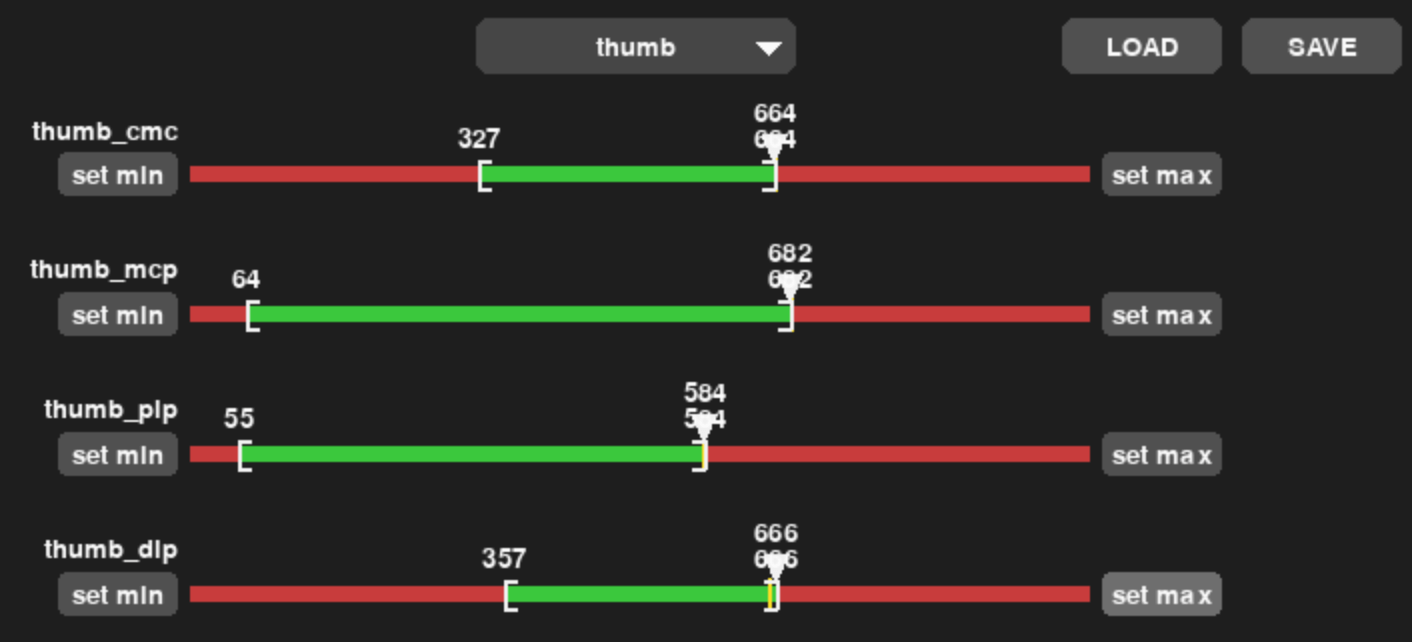
Once you have set the appropriate boundaries for all joints, click “Save” to save the calibration values to the motors.
1.2 Calibrate Teleoperator Glove#
lerobot-calibrate \
    --teleop.type=homunculus_glove \
    --teleop.port=/dev/tty.usbmodem11201 \
    --teleop.id=red \
    --teleop.side=right
Move each finger through its full range of motion, starting from the thumb.
Move thumb through its entire range of motion.
Recording positions. Press ENTER to stop...

-------------------------------------------
NAME      |    MIN |    POS |    MAX
thumb_cmc |   1790 |   1831 |   1853
thumb_mcp |   1497 |   1514 |   1528
thumb_pip |   1466 |   1496 |   1515
thumb_dip |   1463 |   1484 |   1514
Continue with each finger:
Move middle through its entire range of motion.
Recording positions. Press ENTER to stop...

-------------------------------------------
NAME                 |    MIN |    POS |    MAX
middle_mcp_abduction |   1598 |   1718 |   1820
middle_mcp_flexion   |   1512 |   1658 |   2136
middle_dip           |   1484 |   1500 |   1547
Once calibration is complete, the system will save the calibration to /Users/your_username/.cache/huggingface/lerobot/calibration/teleoperators/homunculus_glove/red.json
1.3 Calibrate Robot Arm#
lerobot-calibrate \
    --robot.type=hope_jr_arm \
    --robot.port=/dev/tty.usbserial-1110 \
    --robot.id=white
This will open a calibration GUI where you can set the range limits for each motor. The arm motions are organized as follows:
Shoulder: pitch, yaw, and roll
Elbow: flex
Wrist: pitch, yaw, and roll
Use the calibration interface to set the range boundaries for each joint. Move each joint through its full range of motion and adjust the minimum and maximum values accordingly. Once you have set the appropriate boundaries for all joints, save the calibration.
1.4 Calibrate Teleoperator Exoskeleton#
lerobot-calibrate \
    --teleop.type=homunculus_arm \
    --teleop.port=/dev/tty.usbmodem11201 \
    --teleop.id=black
The exoskeleton allows one to control the robot arm. During calibration, you’ll be prompted to move all joints through their full range of motion:
Move all joints through their entire range of motion.
Recording positions. Press ENTER to stop...

-------------------------------------------
-------------------------------------------
NAME            |    MIN |    POS |    MAX
shoulder_pitch  |    586 |    736 |    895
shoulder_yaw    |   1257 |   1374 |   1390
shoulder_roll   |    449 |   1034 |   2564
elbow_flex      |   3023 |   3117 |   3134
wrist_roll      |   3073 |   3096 |   3147
wrist_yaw       |   2143 |   2171 |   2185
wrist_pitch     |   1975 |   1993 |   2074
Calibration saved to /Users/your_username/.cache/huggingface/lerobot/calibration/teleoperators/homunculus_arm/black.json
Step 2: Teleoperation#
Due to global variable conflicts in the Feetech middleware, teleoperation for arm and hand must run in separate shell sessions:
Hand#
lerobot-teleoperate \
    --robot.type=hope_jr_hand \
    --robot.port=/dev/tty.usbmodem58760432281 \
    --robot.id=blue \
    --robot.side=right \
    --teleop.type=homunculus_glove \
    --teleop.port=/dev/tty.usbmodem11201 \
    --teleop.id=red \
    --teleop.side=right \
    --display_data=true \
    --fps=30
Arm#
lerobot-teleoperate \
    --robot.type=hope_jr_arm \
    --robot.port=/dev/tty.usbserial-1110 \
    --robot.id=white \
    --teleop.type=homunculus_arm \
    --teleop.port=/dev/tty.usbmodem11201 \
    --teleop.id=black \
    --display_data=true \
    --fps=30
Step 3: Record, Replay, Train#
Record, Replay and Train with Hope-JR is still experimental.
Record#
This step records the dataset, which can be seen as an example here.
lerobot-record \
    --robot.type=hope_jr_hand \
    --robot.port=/dev/tty.usbmodem58760432281 \
    --robot.id=right \
    --robot.side=right \
    --robot.cameras='{"main": {"type": "opencv", "index_or_path": 0, "width": 640, "height": 480, "fps": 30}}' \
    --teleop.type=homunculus_glove \
    --teleop.port=/dev/tty.usbmodem1201 \
    --teleop.id=right \
    --teleop.side=right \
    --dataset.repo_id=<USER>/hand_record_test_with_video_data \
    --dataset.single_task="Hand recording test with video data" \
    --dataset.num_episodes=1 \
    --dataset.episode_time_s=5 \
    --dataset.push_to_hub=true \
    --dataset.private=true \
    --dataset.streaming_encoding=true \
    --dataset.encoder_threads=2 \
    # --dataset.rgb_encoder.vcodec=auto \
    --display_data=true
Replay#
lerobot-replay \
    --robot.type=hope_jr_hand \
    --robot.port=/dev/tty.usbmodem58760432281 \
    --robot.id=right \
    --robot.side=right \
    --dataset.repo_id=<USER>/hand_record_test_with_camera \
    --dataset.episode=0
Train#
lerobot-train \
  --dataset.repo_id=<USER>/hand_record_test_with_video_data \
  --policy.type=act \
  --output_dir=outputs/train/hopejr_hand \
  --job_name=hopejr \
  --policy.device=mps \
  --wandb.enable=true \
  --policy.repo_id=<USER>/hand_test_policy
Evaluate#
This training run can be viewed as an example here.
lerobot-record \
  --robot.type=hope_jr_hand \
  --robot.port=/dev/tty.usbmodem58760432281 \
  --robot.id=right \
  --robot.side=right \
  --robot.cameras='{"main": {"type": "opencv", "index_or_path": 0, "width": 640, "height": 480, "fps": 30}}' \
  --display_data=false \
  --dataset.repo_id=<USER>/eval_hopejr \
  --dataset.single_task="Evaluate hopejr hand policy" \
  --dataset.num_episodes=10 \
  --dataset.streaming_encoding=true \
  --dataset.encoder_threads=2 \
  # --dataset.rgb_encoder.vcodec=auto \
  --policy.path=outputs/train/hopejr_hand/checkpoints/last/pretrained_model