LIBERO-plus#
← Tutorial Library · Simulation and Benchmarks
This section introduces the general functions of LeRobot. Please configure the example according to the target robot, data set and operating environment; before using it with AlohaMini 2 / 2 Pro, you need to confirm the hardware and interface compatibility.
LIBERO-plus is a robustness benchmark for Vision-Language-Action (VLA) models built on top of LIBERO. It systematically stress-tests policies by applying seven independent perturbation dimensions to the original LIBERO task set, exposing failure modes that standard benchmarks miss.
Paper: In-depth Robustness Analysis of Vision-Language-Action Models
GitHub: sylvestf/LIBERO-plus
Dataset: lerobot/libero_plus
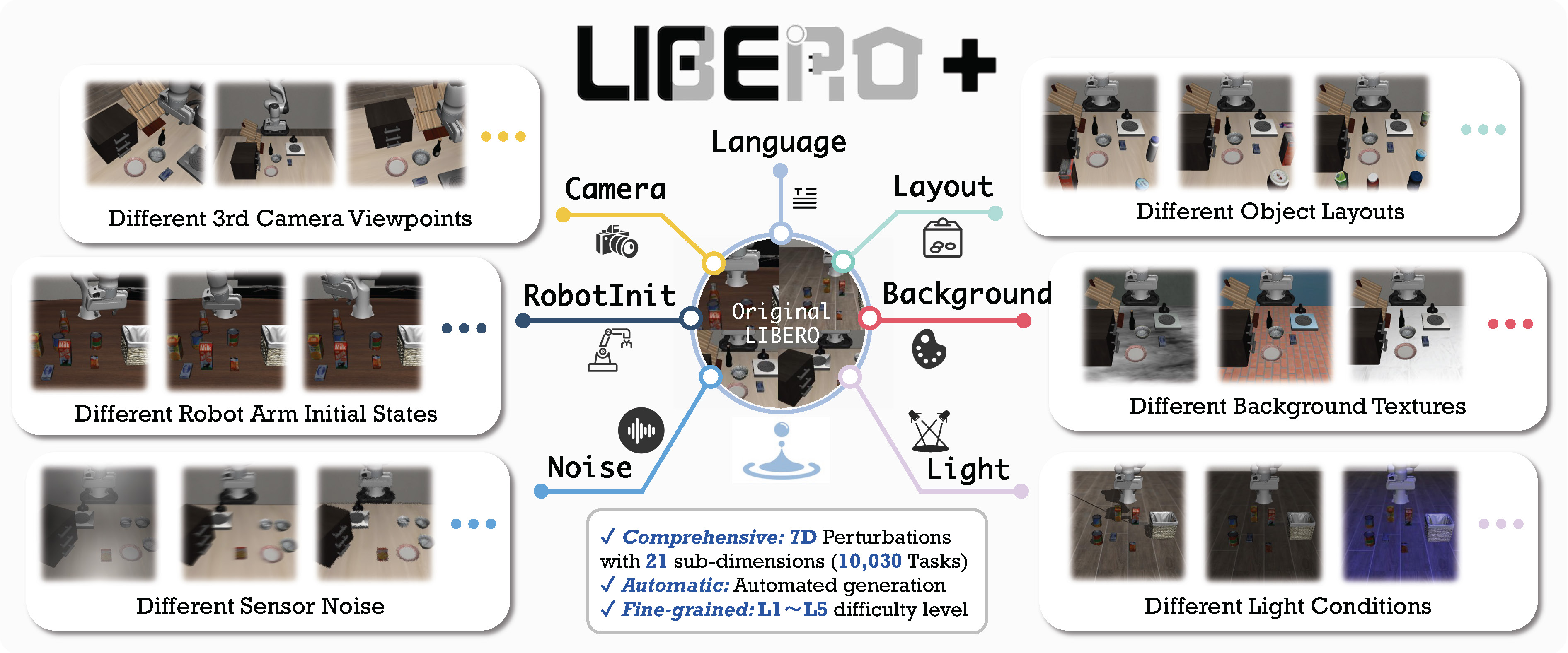
Perturbation dimensions#
LIBERO-plus creates ~10 000 task variants by perturbing each original LIBERO task along these axes:
Dimension |
What changes |
|---|---|
Objects layout |
Target position, presence of confounding objects |
Camera viewpoints |
Camera position, orientation, field-of-view |
Robot initial states |
Manipulator start pose |
Language instructions |
LLM-rewritten task description (paraphrase / synonym) |
Light conditions |
Intensity, direction, color, shadow |
Background textures |
Scene surface and object appearance |
Sensor noise |
Photometric distortions and image degradation |
Available task suites#
LIBERO-plus covers the same five suites as LIBERO:
Suite |
CLI name |
Tasks |
Max steps |
Description |
|---|---|---|---|---|
LIBERO-Spatial |
|
10 |
280 |
Tasks requiring reasoning about spatial relations |
LIBERO-Object |
|
10 |
280 |
Tasks centered on manipulating different objects |
LIBERO-Goal |
|
10 |
300 |
Goal-conditioned tasks with changing targets |
LIBERO-90 |
|
90 |
400 |
Short-horizon tasks from the LIBERO-100 collection |
LIBERO-Long |
|
10 |
520 |
Long-horizon tasks from the LIBERO-100 collection |
Tips
Installing LIBERO-plus replaces vanilla LIBERO — it uninstalls hf-libero
so that import libero resolves to the LIBERO-plus fork. You cannot have both
installed at the same time. To switch back to vanilla LIBERO, uninstall the
fork and reinstall with pip install -e ".[libero]".
Installation#
System dependencies (Linux only)#
sudo apt install libexpat1 libfontconfig1-dev libmagickwand-dev
Python package#
pip install -e ".[libero]" "robosuite==1.4.1" bddl easydict mujoco wand scikit-image gym
git clone https://github.com/sylvestf/LIBERO-plus.git
cd LIBERO-plus && pip install --no-deps -e .
pip uninstall -y hf-libero  # so `import libero` resolves to the fork
LIBERO-plus is installed from its GitHub fork rather than a pyproject extra — the fork ships as a namespace package that pip can’t handle, so it must be cloned and added to PYTHONPATH. See docker/Dockerfile.benchmark.libero_plus for the canonical install. MuJoCo is required, so only Linux is supported.
Tips
Set the MuJoCo rendering backend before running evaluation:
export MUJOCO_GL=egl # headless / HPC / cloud
Download LIBERO-plus assets#
LIBERO-plus ships its extended asset pack separately. Download assets.zip from the Hugging Face dataset and extract it into the LIBERO-plus package directory:
# After installing the package, find where it was installed:
python -c "import libero; print(libero.__file__)"
# Then extract assets.zip into <package_root>/libero/assets/
Evaluation#
Default evaluation (recommended)#
Evaluate across the four standard suites (10 episodes per task):
lerobot-eval \
  --policy.path="your-policy-id" \
  --env.type=libero_plus \
  --env.task=libero_spatial,libero_object,libero_goal,libero_10 \
  --eval.batch_size=1 \
  --eval.n_episodes=10 \
  --env.max_parallel_tasks=1
Single-suite evaluation#
Evaluate on one LIBERO-plus suite:
lerobot-eval \
  --policy.path="your-policy-id" \
  --env.type=libero_plus \
  --env.task=libero_spatial \
  --eval.batch_size=1 \
  --eval.n_episodes=10
--env.taskpicks the suite (libero_spatial,libero_object, etc.).--env.task_idsrestricts to specific task indices ([0],[1,2,3], etc.). Omit to run all tasks in the suite.--eval.batch_sizecontrols how many environments run in parallel.--eval.n_episodessets how many episodes to run per task.
Multi-suite evaluation#
Benchmark a policy across multiple suites at once by passing a comma-separated list:
lerobot-eval \
  --policy.path="your-policy-id" \
  --env.type=libero_plus \
  --env.task=libero_spatial,libero_object \
  --eval.batch_size=1 \
  --eval.n_episodes=10
Control mode#
LIBERO-plus supports two control modes — relative (default) and absolute. Different VLA checkpoints are trained with different action parameterizations, so make sure the mode matches your policy:
--env.control_mode=relative # or "absolute"
Policy inputs and outputs#
Observations:
observation.state— 8-dim proprioceptive features (eef position, axis-angle orientation, gripper qpos)observation.images.image— main camera view (agentview_image), HWC uint8observation.images.image2— wrist camera view (robot0_eye_in_hand_image), HWC uint8
Actions:
Continuous control in
Box(-1, 1, shape=(7,))— 6D end-effector delta + 1D gripper
Recommended evaluation episodes#
For reproducible benchmarking, use 10 episodes per task across all four standard suites (Spatial, Object, Goal, Long). This gives 400 total episodes and matches the protocol used for published results.
Training#
Dataset#
A LeRobot-format training dataset for LIBERO-plus is available at:
Example training command#
lerobot-train \
    --policy.type=smolvla \
    --policy.repo_id=${HF_USER}/smolvla_libero_plus \
    --policy.load_vlm_weights=true \
    --dataset.repo_id=lerobot/libero_plus \
    --env.type=libero_plus \
    --env.task=libero_spatial \
    --output_dir=./outputs/ \
    --steps=100000 \
    --batch_size=4 \
    --eval.batch_size=1 \
    --eval.n_episodes=1 \
    --env_eval_freq=1000
Relationship to LIBERO#
LIBERO-plus is a drop-in extension of LIBERO:
Same Python gym interface (
LiberoEnv,LiberoProcessorStep)Same camera names and observation/action format
Same task suite names
Installs under the same
liberoPython package name (different GitHub repo)
To use the original LIBERO benchmark, see LIBERO and use --env.type=libero.