GR00T Policy#
← 教程资料库 · 策略与模型
本节介绍 LeRobot 的通用功能。请按目标机器人、数据集和运行环境配置示例;用于 AlohaMini 2 / 2 Pro 前,需要确认硬件与接口兼容性。
GR00T is an NVIDIA foundation model family for generalized humanoid robot reasoning and skills. It is a cross-embodiment policy that accepts multimodal input, including language, images, and proprioception, to perform manipulation tasks in diverse environments.
LeRobot integrates GR00T N1.7 through the groot policy type.
[!WARNING] Breaking change: GR00T N1.5 support was removed from LeRobot, and current releases support GR00T N1.7 only. N1.5 checkpoints and configs are rejected with a migration note. To keep using an N1.5 checkpoint, pin the last release that supports it:
pip install 'lerobot==0.5.1'. To use the current release, migrate to GR00T N1.7 (base modelnvidia/GR00T-N1.7-3B).
Model Overview#
GR00T N1.7 uses a Cosmos-Reason2/Qwen3-VL backbone and provides checkpoints for SimplerEnv, DROID, and LIBERO.
Developers and researchers can post-train GR00T with their own real or synthetic data to adapt it for specific humanoid robots or tasks.
GR00T uses pre-trained vision and language encoders with a flow matching action transformer to model a chunk of actions conditioned on vision, language, and proprioception.
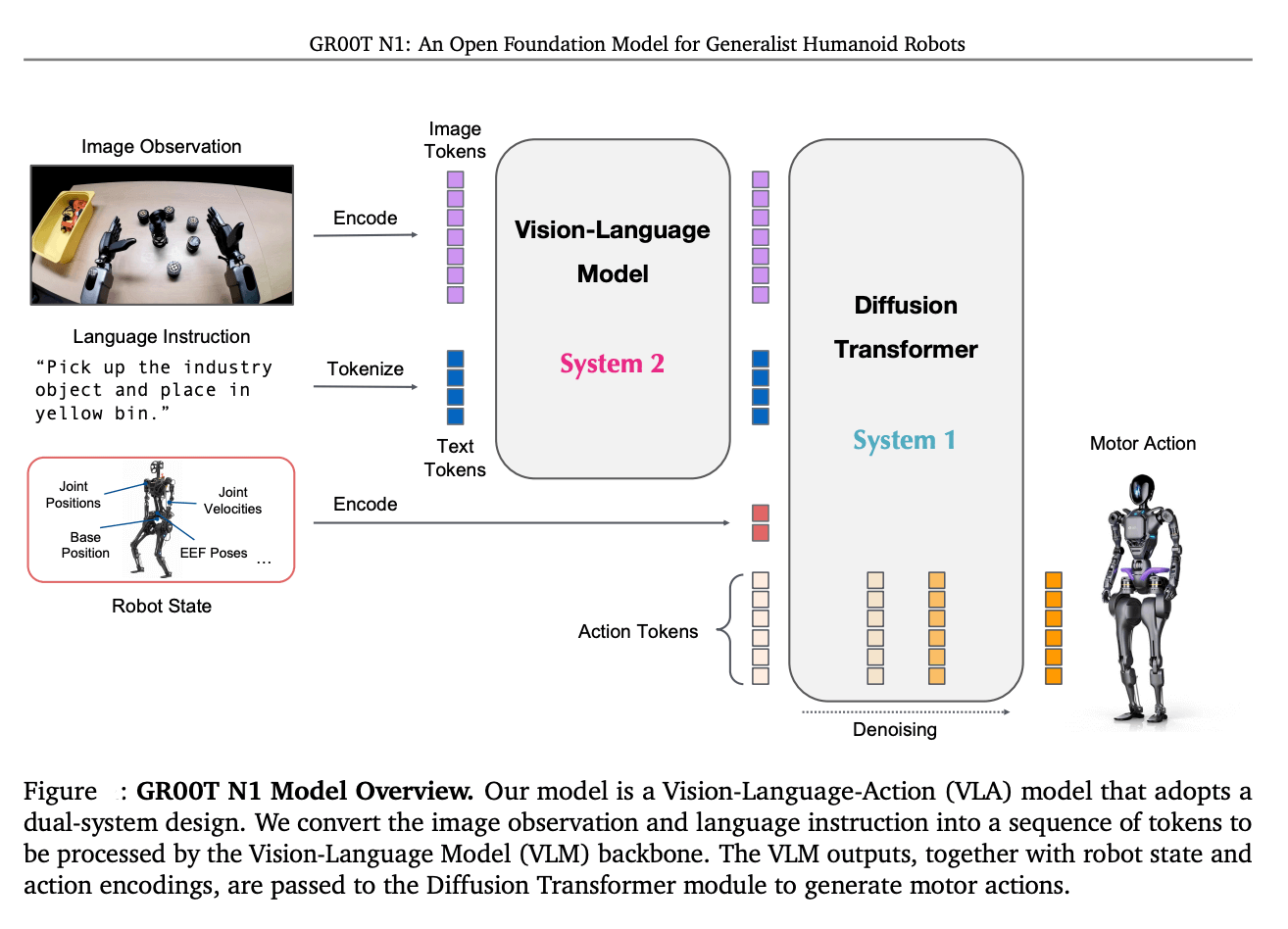
Its strong performance comes from being trained on an expansive and diverse humanoid dataset, which includes:
Real captured data from robots.
Synthetic data generated using NVIDIA Isaac GR00T Blueprint.
Internet-scale video data.
This approach allows the model to be highly adaptable through post-training for specific embodiments, tasks, and environments.
Installation Requirements#
GR00T is intended for NVIDIA GPU-accelerated systems. Install LeRobot with the GR00T extra:
pip install "lerobot[groot]"
For a source checkout:
pip install -e ".[groot]"
Usage#
To use GR00T N1.7:
--policy.type=groot
Training#
Training Command Example#
Here's a complete training command for finetuning the base GR00T model on your own dataset:
This command is using the new_embodiment flag, which is used for the SO-101 robot, read more about how GR00T handles different embodiments..
# install extra deps for training
pip install "lerobot[training]"

hf auth login
wandb login

export DATASET_NAME=your_data_set
export HF_USER=your_hf_username
export DATASET=$HF_USER/$DATASET_NAME
export REPO_ID="${DATASET}_GR00T17" #this is the model that will be uploaded to huggingface
export OUTPUT_DIR=outputs/train/$REPO_ID

lerobot-train \
  --dataset.repo_id=$DATASET \
  --dataset.image_transforms.enable=true \
  --policy.type=groot \
  --policy.device=cuda \
  --policy.base_model_path=nvidia/GR00T-N1.7-3B \
  --policy.embodiment_tag=new_embodiment \
  --policy.chunk_size=16 \
  --policy.n_action_steps=16 \
  --policy.use_relative_actions=true \
  --policy.relative_exclude_joints='["gripper"]' \
  --policy.use_bf16=true \
  --policy.push_to_hub=true \
  --policy.repo_id=$REPO_ID \
  --seed=42 \
  --batch_size=64 \
  --steps=20000 \
  --save_checkpoint=true \
  --save_freq=5000 \
  --use_policy_training_preset=true \
  --env_eval_freq=0 \
  --eval_steps=0 \
  --log_freq=10 \
  --output_dir=$OUTPUT_DIR \
  --job_name=$DATASET \
  --wandb.enable=true \
  --wandb.disable_artifact=true
Performance Results#
LIBERO Benchmark Results#
[!NOTE] Follow the LIBERO setup instructions before running
lerobot-eval.
GR00T N1.7 has demonstrated strong performance on the LIBERO benchmark suite. To reproduce LeRobot results, follow the instructions in the LIBERO section.
Train on LIBERO#
Example training command for a LIBERO suite (here libero_spatial):
IMAGE_TRANSFORMS='{
  "brightness": {"weight": 1.0, "type": "ColorJitter", "kwargs": {"brightness": [0.7, 1.3]}},
  "contrast":   {"weight": 1.0, "type": "ColorJitter", "kwargs": {"contrast":   [0.6, 1.4]}},
  "saturation": {"weight": 1.0, "type": "ColorJitter", "kwargs": {"saturation": [0.5, 1.5]}},
  "hue":        {"weight": 1.0, "type": "ColorJitter", "kwargs": {"hue":        [-0.08, 0.08]}}
}'

lerobot-train \
  --dataset.repo_id=IPEC-COMMUNITY/libero_spatial_no_noops_1.0.0_lerobot \
  --dataset.root=/datasets/libero_spatial \
  --dataset.revision=main \
  --dataset.video_backend=pyav \
  --dataset.image_transforms.enable=true \
  --dataset.image_transforms.max_num_transforms=4 \
  --dataset.image_transforms.tfs="$IMAGE_TRANSFORMS" \
  --policy.type=groot \
  --policy.base_model_path=nvidia/GR00T-N1.7-3B \
  --policy.embodiment_tag=libero_sim \
  --policy.push_to_hub=false \
  --policy.use_relative_actions=false \
  --policy.max_steps=20000 \
  --batch_size=320 \
  --steps=20000 \
  --save_freq=2000 \
  --env_eval_freq=0 \
  --eval_steps=0 \
  --log_freq=10 \
  --wandb.enable=true \
  --wandb.project=lerobot \
  --wandb.mode=online \
  --wandb.disable_artifact=true \
  --num_workers=4 \
  --prefetch_factor=2 \
  --persistent_workers=true \
  --output_dir=$OUTPUT_DIR \
  --job_name=$JOB_NAME
This will follow the recipe found here.
GR00T N1.7 LIBERO Results#
Preliminary LeRobot integration results (GR00T-LeRobot, eval.n_episodes >= 50 per suite):
Suite |
Success rate |
Checkpoint |
|---|---|---|
LIBERO Spatial |
95% |
|
LIBERO Object |
100% |
|
LIBERO Goal |
98% |
|
LIBERO 10 (Long) |
93% |
|
Average |
96.5% |
export MODEL_ID=your_trained_model_on_huggingface

lerobot-eval \
  --policy.type=groot \
  --policy.base_model_path=$MODEL_ID \
  --policy.embodiment_tag=libero_sim \
  --env.type=libero \
  --env.task=libero_spatial \
  --eval.n_episodes=50
Use eval.n_episodes >= 50 per suite when reporting success rates.
Evaluate in your hardware setup#
Once you have trained your model using your parameters you can run inference in your downstream task. Follow the instructions in Policy Deployment (lerobot-rollout). For example:
# install extra deps for roullout and real hardware
pip install "lerobot[feetech,viz]"

export MODEL_ID=your_trained_model_on_huggingface

# make sure that camera index matches your setup!
# find index using `uv run lerobot-find-cameras opencv`
WRIST_CAM='wrist: {type: opencv, index_or_path: 2, width: 640, height: 480, fps: 30, fourcc: "MJPG"}'
FRONT_CAM='front: {type: opencv, index_or_path: 0, width: 640, height: 480, fps: 30, fourcc: "MJPG"}'
export ROBOT_CAMERAS="{ $WRIST_CAM, $FRONT_CAM }"
export ROBOT_ID=follower_robot
export ROBOT_PORT=/dev/ttyACM0

uv run lerobot-rollout \
  --strategy.type=base \
  --policy.path=$MODEL_ID \
  --policy.base_model_path=nvidia/GR00T-N1.7-3B \
  --policy.n_action_steps=8 \
  --robot.type=so101_follower \
  --robot.port=$ROBOT_PORT \
  --robot.id=$ROBOT_ID \
  --robot.cameras="$ROBOT_CAMERAS" \
  --task="place the vial in the rack" \
  --duration=60 \
  --device=cuda \
  --display_data=true \
  --inference.type=rtc \
  --inference.rtc.enabled=True \ # set to False if it causes inference instability
  --inference.rtc.execution_horizon=8 \
  --inference.queue_threshold=0
[!NOTE] Value of
inference.queue_thresholdshould not exceed 5 to ensure stable inference.
License#
GR00T N1.7 is released under the NVIDIA Open Model License Agreement.