SARM: Stage-Aware Reward Modeling#
← 教程资料库 · 策略与模型
本节介绍 LeRobot 的通用功能。请按目标机器人、数据集和运行环境配置示例;用于 AlohaMini 2 / 2 Pro 前,需要确认硬件与接口兼容性。
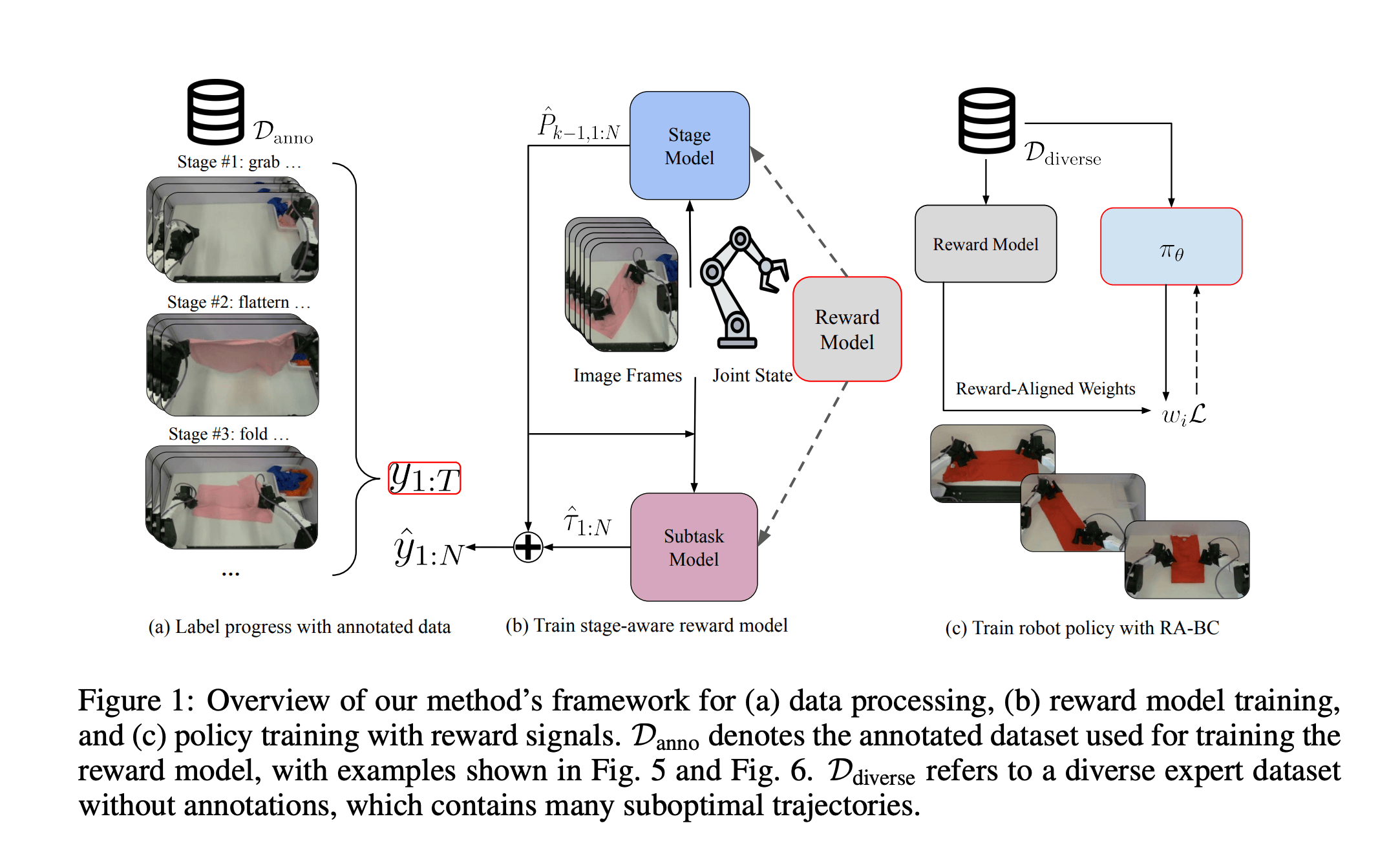
SARM (Stage-Aware Reward Modeling) is a video-based reward modeling framework for long-horizon robot manipulation tasks. This guide covers how to train SARM reward models and optionally use them with Reward-Aligned Behavior Cloning (RA-BC).
Paper: SARM: Stage-Aware Reward Modeling for Long Horizon Robot Manipulation
Why Reward Models?#
Standard behavior cloning treats all demonstration frames equally, but real-world robot datasets are messy. They contain hesitations, corrections, and variable-quality trajectories. Reward models solve this by learning a generalizable notion of task progress from demonstrations: given video frames and a task description, they predict how close the robot is to completing the task (0→1). This learned "progress signal" can be used in multiple ways, two promising applications are: (1) weighted imitation learning (RA-BC), where high-progress frames receive more weight during policy training, and (2) reinforcement learning, where the reward model provides dense rewards for online or offline policy improvement.
Overview#
SARM has following features:
Stage-aware architecture: Jointly predicts the high-level task stage and fine-grained progress within each stage
Subtask annotations: Uses natural language subtask annotations to derive consistent progress labels
Temporal proportions: Computes dataset-level priors (α̅_k) for each subtask to normalize progress across variable-length demonstrations
SARM trains on a compact stage+tau target for each frame:
stage: integer stage index
k ∈ {0, ..., K-1}τ (tau): within-stage progress
τ ∈ [0, 1]target encoding:
y = k + τ(this is what the dataset processor produces)
At inference time (and in downstream RA-BC), SARM converts the raw k + τ value into a normalized progress in [0, 1] using dataset-level temporal proportions α̅_k (stored in meta/temporal_proportions_*.json).
This matches Formula (2) from the paper:
progress_t = P_{k-1} + α̅_k × τ_t
Where:
τ_t = (t - s_k) / (e_k - s_k)is within-subtask normalized timeP_{k-1}is cumulative prior (sum of previous subtask proportions)α̅_kis the temporal proportion for subtask k
This ensures identical task states map to consistent progress values, even across demonstrations of different lengths.
Inputs and Targets (What the new code expects)#
SARM is trained through its processor (src/lerobot/rewards/sarm/processor_sarm.py), which:
Encodes images and task text with CLIP (ViT-B/32) into
video_featuresandtext_featuresPads/truncates robot state into
state_features(up tomax_state_dim)Builds targets as
sparse_targets(anddense_targetsindense_only/dual) using the stage+tau encodingy = k + τMasks rewind frames using a per-sample
lengthstensor (rewind is a training-time augmentation)
At minimum, each training sample needs:
task(string): task descriptionpolicy.image_keyimages andpolicy.state_keystates from the dataset
Annotation Modes#
You can choose from 3 annotation modes that determine how progress labels are computed:
Mode |
Annotations Required |
Heads |
Use Case |
|---|---|---|---|
|
None |
Sparse only |
Simple tasks, quick experiments, no VLM needed |
|
Dense (VLM) |
Dual (sparse auto-generated) |
Detailed subtask tracking without defining high-level stages |
|
Sparse + Dense (VLM) |
Dual |
Full SARM paper setup with both granularities |
Mode Details#
single_stage
No annotations required. The entire episode is treated as a single stage called "task", and progress is linear from 0 to 1 over the episode duration.
Sparse head: 1 stage ("task"), linear progress
Dense head: Not used
Best for: Simple tasks, quick experiments, or when VLM annotation is not available
Set Up Your Environment#
Install LeRobot by following our Installation Guide.
Install SARM dependencies by running:
pip install -e ".[sarm]"
Workflow:
1. Train SARM → 2. Visualize predictions → 3. (Optional) Train policy with RA-BC
dense_only
Only dense (fine-grained) annotations from a VLM. The sparse head automatically uses a single "task" stage covering the full episode, while the dense head learns detailed subtask progression.
Sparse head: 1 stage ("task"), linear progress (auto-generated)
Dense head: Multiple fine-grained stages from VLM annotations
Best for: When you want detailed subtask tracking but don't need to define high-level stages
Workflow:
1. Annotate (dense) → 2. Verify → 3. Train SARM → 4. Visualize → 5. (Optional) Train policy with RA-BC
dual
Both sparse and dense annotations from VLM. Full dual-head mode as described in the SARM paper, with both high-level (sparse) and fine-grained (dense) stage predictions.
Sparse head: High-level stages from VLM annotations
Dense head: Fine-grained stages from VLM annotations
Best for: Complex multi-stage tasks where both granularities are useful
Workflow:
1. Annotate (sparse+dense) → 2. Verify → 3. Train SARM → 4. Visualize → 5. (Optional) Train policy with RA-BC
Step 1: Subtask Annotation#
single_stage
No annotation required! Skip this step entirely. The model will use the episode's task description and compute linear progress automatically.
dense_only
Generate dense (fine-grained) annotations only using a VLM. The sparse stage will be auto-generated.
python src/lerobot/data_processing/sarm_annotations/subtask_annotation.py \
  --repo-id your-username/your-dataset \
  --dense-only \
  --dense-subtasks "Bring robot arms up from starting position,Grab near side and do 1st fold,Grab side and do 2nd fold,Grab side and do 3rd fold to finish folding" \
  --video-key observation.images.base \
  --num-workers 4 \
  --push-to-hub
What gets saved:
meta/temporal_proportions_sparse.json- Auto-generated sparse proportions ({"task": 1.0})meta/temporal_proportions_dense.json- Dense temporal proportionsPer-episode columns in
episodes/*.parquet:dense_subtask_names,dense_subtask_start_frames,dense_subtask_end_frames(also time-based columns:
dense_subtask_start_times,dense_subtask_end_times)
dual
Generate both sparse (high-level) and dense (fine-grained) annotations using a VLM.
python src/lerobot/data_processing/sarm_annotations/subtask_annotation.py \
  --repo-id your-username/your-dataset \
  --sparse-subtasks "Bring arms up from starting position,Fold the towel (3 folds in total)" \
  --dense-subtasks "Bring robot arms up from starting position,Grab near side and do 1st fold,Grab side and do 2nd fold,Grab side and do 3rd fold to finish folding" \
  --video-key observation.images.base \
  --num-workers 4 \
  --push-to-hub
What gets saved:
meta/temporal_proportions_sparse.json- Sparse temporal proportionsmeta/temporal_proportions_dense.json- Dense temporal proportionsPer-episode columns in
episodes/*.parquet:sparse_subtask_names,sparse_subtask_start_frames,sparse_subtask_end_framesdense_subtask_names,dense_subtask_start_frames,dense_subtask_end_frames(also time-based columns:
*_subtask_start_times,*_subtask_end_times)
Annotation Arguments#
Argument |
Description |
|---|---|
|
HuggingFace dataset repository ID |
|
Comma-separated list of high-level subtask names |
|
Comma-separated list of fine-grained subtask names |
|
Generate only dense annotations (auto-creates sparse "task" stage) |
|
Camera/video key to use (e.g., |
|
Number of parallel GPU workers (default: 1) |
|
Specific episode indices to annotate (default: all) |
|
Skip episodes that already have annotations |
|
VLM model (default: |
|
Number of episodes to visualize after annotation (default: 5, set to 0 to skip) |
Note: After annotation completes, 5 episodes are automatically visualized by default. Use
--num-visualizations 0to skip this step.
Step 2: Verify Annotations#
single_stage
No verification needed! Skip this step.
dense_only
Visualize annotations using the --visualize-only flag:
python src/lerobot/data_processing/sarm_annotations/subtask_annotation.py \
  --repo-id your-username/your-dataset \
  --visualize-only \
  --visualize-type dense \
  --num-visualizations 5 \
  --video-key observation.images.base \
  --output-dir ./subtask_viz
dual
Visualize annotations using the --visualize-only flag:
python src/lerobot/data_processing/sarm_annotations/subtask_annotation.py \
  --repo-id your-username/your-dataset \
  --visualize-only \
  --visualize-type both \
  --num-visualizations 5 \
  --video-key observation.images.base \
  --output-dir ./subtask_viz
This generates visualizations showing video frames with subtask boundaries overlaid and timeline of subtasks.
Visualization Arguments#
Argument |
Description |
|---|---|
|
Only visualize existing annotations (no generation) |
|
Number of episodes to visualize (default: 5) |
|
Type of annotations to visualize: |
Tip: If annotations are inaccurate, adjust your subtask descriptions to be more specific and re-run.
Step 3: Train SARM#
single_stage
Train with no annotations - uses linear progress from 0 to 1:
lerobot-train \
  --dataset.repo_id=your-username/your-dataset \
  --policy.type=sarm \
  --policy.annotation_mode=single_stage \
  --policy.image_key=observation.images.base \
  --output_dir=outputs/train/sarm_single \
  --batch_size=32 \
  --steps=5000 \
  --wandb.enable=true \
  --wandb.project=sarm \
  --policy.repo_id=your-username/your-model-name
dense_only
Train with dense annotations only (sparse auto-generated):
lerobot-train \
  --dataset.repo_id=your-username/your-dataset \
  --policy.type=sarm \
  --policy.annotation_mode=dense_only \
  --policy.image_key=observation.images.base \
  --output_dir=outputs/train/sarm_dense \
  --batch_size=32 \
  --steps=5000 \
  --wandb.enable=true \
  --wandb.project=sarm \
  --policy.repo_id=your-username/your-model-name
dual
Train with both sparse and dense annotations:
lerobot-train \
  --dataset.repo_id=your-username/your-dataset \
  --policy.type=sarm \
  --policy.annotation_mode=dual \
  --policy.image_key=observation.images.base \
  --output_dir=outputs/train/sarm_dual \
  --batch_size=32 \
  --steps=5000 \
  --wandb.enable=true \
  --wandb.project=sarm \
  --policy.repo_id=your-username/your-model-name
Multi-GPU Training#
Add accelerate launch --multi_gpu --num_processes=4 to use multiple GPUs for training.
Training Arguments#
Argument |
Description |
Default |
|---|---|---|
|
|
|
|
Camera key for images |
|
|
Key for joint states |
|
|
Observation history steps (total obs frames = |
|
|
Gap (in frames) between sampled observations (at 30 fps: 30 ≈ 1s) |
|
Step 4: Visualize Predictions#
Use compute_rabc_weights.py with --visualize-only to visualize model predictions (and, if available, annotation-derived targets) without writing a parquet file.
single_stage
python -m lerobot.rewards.sarm.compute_rabc_weights \
  --dataset-repo-id your-username/your-dataset \
  --reward-model-path your-username/sarm-model \
  --visualize-only \
  --num-visualizations 5 \
  --head-mode sparse \
  --output-dir ./sarm_viz
dense_only
python -m lerobot.rewards.sarm.compute_rabc_weights \
  --dataset-repo-id your-username/your-dataset \
  --reward-model-path your-username/sarm-model \
  --visualize-only \
  --num-visualizations 5 \
  --head-mode dense \
  --output-dir ./sarm_viz
dual
python -m lerobot.rewards.sarm.compute_rabc_weights \
  --dataset-repo-id your-username/your-dataset \
  --reward-model-path your-username/sarm-model \
  --visualize-only \
  --num-visualizations 5 \
  --head-mode both \
  --output-dir ./sarm_viz
The visualization shows:
Progress plot: Predicted progress (and optional annotation-derived “GT” when available and
--stride 1)Stage probabilities: Stacked area plot of predicted stage probabilities
Sample frames: Key frames from the episode with progress/stage labels
Visualization Arguments#
Argument |
Description |
|---|---|
|
Only visualize predictions (no RABC computation) |
|
Number of episodes to visualize (default: 5) |
|
SARM head to use: |
|
Compute every N frames, interpolate the rest (default: 1) |
Step 5 (Optional): Train Policy with RA-BC#
Reward-Aligned Behavior Cloning (RA-BC) uses the trained SARM model to weight training samples based on predicted progress improvement. This requires two steps:
Precompute progress values for all frames using the trained SARM model
Train policy with RA-BC weighting using the precomputed values
How RA-BC Works#
For each training sample, RA-BC computes the progress delta:
r_i = φ(o_{t+Δ}) - φ(o_t)
Where φ is the SARM progress prediction and Δ is the policy's chunk_size. Samples with positive progress (good demonstrations) get higher weights, while samples with negative or zero progress get down-weighted.
The weighting follows Equations 8-9 from the paper:
Soft weight:
w̃_i = clip((r_i − (μ − 2σ)) / (4σ + ε), 0, 1)Final weight:
w_i = 𝟙{r_i > κ} + 𝟙{0 ≤ r_i ≤ κ} × w̃_i
Step 5a: Compute SARM Progress Values#
First, run the SARM model on all frames in your dataset to compute progress values:
python -m lerobot.rewards.sarm.compute_rabc_weights \
  --dataset-repo-id your-username/your-dataset \
  --reward-model-path your-username/sarm-model \
  --head-mode sparse \
  --num-visualizations 5 \
  --push-to-hub
This script:
Processes all frames and computes progress values
Saves progress values to a parquet file next to the dataset on disk (defaults to
<dataset_root>/sarm_progress.parquet)Generates visualizations of the first N episodes (default: 5)
Arguments:
Argument |
Description |
Default |
|---|---|---|
|
Path to trained SARM model |
(required) |
|
SARM head to use: |
|
|
Device for inference |
|
|
Only visualize predictions (no RA-BC computation) |
|
|
Number of episodes to visualize (default: 5, set to 0 to skip) |
|
Output format (sarm_progress.parquet):
Column |
Description |
|---|---|
|
Global frame index in dataset |
|
Episode number |
|
Local frame index within episode |
|
Sparse head progress value [0, 1] |
|
Dense head progress value [0, 1] (if computed) |
Step 5b: Train Policy with RA-BC#
Once you have the progress file, train your policy with RA-BC weighting. The progress file is auto-detected from the dataset path (sarm_progress.parquet) if not explicitly provided. Currently PI0, PI0.5 and SmolVLA are supported with RA-BC:
lerobot-train \
  --dataset.repo_id=your-username/your-dataset \
  --policy.type=pi0 \
  --sample_weighting.type=rabc \
  --sample_weighting.head_mode=sparse \
  --sample_weighting.kappa=0.01 \
  --output_dir=outputs/train/policy_rabc \
  --batch_size=32 \
  --steps=40000
The training script automatically:
Loads the precomputed progress values from the parquet file
Uses the policy's
chunk_sizeto compute progress deltas (Δ)Computes sample weights based on progress improvement
Applies weighted loss during training
RA-BC Arguments:
Argument |
Description |
Default |
|---|---|---|
|
Weighting strategy type ( |
|
|
Path to progress parquet file |
|
|
Which SARM head's progress to use: |
|
|
Threshold κ for high-quality samples |
|
|
Small constant for numerical stability |
|
Tuning RA-BC Kappa#
The kappa parameter is the threshold that determines which samples get full weight (w=1). Understanding how to tune it is critical for RA-BC to work effectively.
How the weighting works:
Condition |
Weight |
|---|---|
|
1.0 (hard threshold) |
|
Soft weight from Eq. 8 |
|
0.0 (negative progress) |
Diagnosing kappa issues:
Monitor these WandB metrics during training:
Metric |
Healthy Range |
Problem Indicator |
|---|---|---|
|
0.3 - 0.8 |
≈ 1.0 means kappa too low |
|
> 0 |
Should be positive |
|
> 0 |
Variance in data quality |
If sample_weight_mean_weight ≈ 1.0: Your kappa is too low. Most samples have delta > kappa and bypass the soft-weighting entirely. RA-BC becomes equivalent to vanilla BC.
Setting kappa based on your data:
The default kappa=0.01 was tuned for the paper's T-shirt folding task (~90s episodes at 30fps). For your dataset, check the logged sample_weighting/delta_mean and sample_weighting/delta_std:
# If delta_mean ≈ 0.03 and delta_std ≈ 0.02:
# Most deltas fall in range [0.01, 0.05]

# Option 1: Set kappa = delta_mean (medium selectivity)
--sample_weighting.kappa=0.03

# Option 2: Set kappa = delta_mean + delta_std (high selectivity)
--sample_weighting.kappa=0.05

# Option 3: Set kappa = delta_mean + 2*delta_std (very selective)
--sample_weighting.kappa=0.07
When RA-BC may not help:
If your dataset is already high quality (consistent progress across all demonstrations), RA-BC won't provide much benefit since there's nothing to filter.
Multi-GPU Training with RA-BC#
accelerate launch \
  --multi_gpu \
  --num_processes=4 \
  src/lerobot/scripts/lerobot_train.py \
  --dataset.repo_id=your-username/your-dataset \
  --policy.type=pi0 \
  --sample_weighting.type=rabc \
  --sample_weighting.kappa=0.01 \
  --output_dir=outputs/train/policy_rabc \
  --batch_size=32 \
  --steps=40000
Tips & Best Practices#
Choosing a Mode#
Start with
single_stagefor quick experiments - no annotation overheadUse
dense_onlywhen you want detailed progress tracking but tasks don't have clear high-level stagesUse
dualfor complex tasks where both coarse and fine-grained progress is meaningful
Annotation Quality#
Be specific with subtask names: Instead of "fold", use "grab near side and fold toward center"
Verify with visualization: Always check a few episodes before training
Consistent naming: Use the same subtask names across all episodes
RA-BC#
Train SARM first: RA-BC quality depends entirely on SARM quality
Monitor
sample_weight_mean_weight: If it's ≈ 1.0, increase kappa (see Tuning RA-BC Kappa)
Citation#
@article{chen2025sarm,
  title={SARM: Stage-Aware Reward Modeling for Long Horizon Robot Manipulation},
  author={Chen, Qianzhong and Yu, Justin and Schwager, Mac and Abbeel, Pieter and Shentu, Yide and Wu, Philipp},
  journal={arXiv preprint arXiv:2509.25358},
  year={2025}
}